RFID LCD login device
I have an RFID chip implanted in my right wrist, and this device lets me use it to log into my desktop and unlock my password manager.
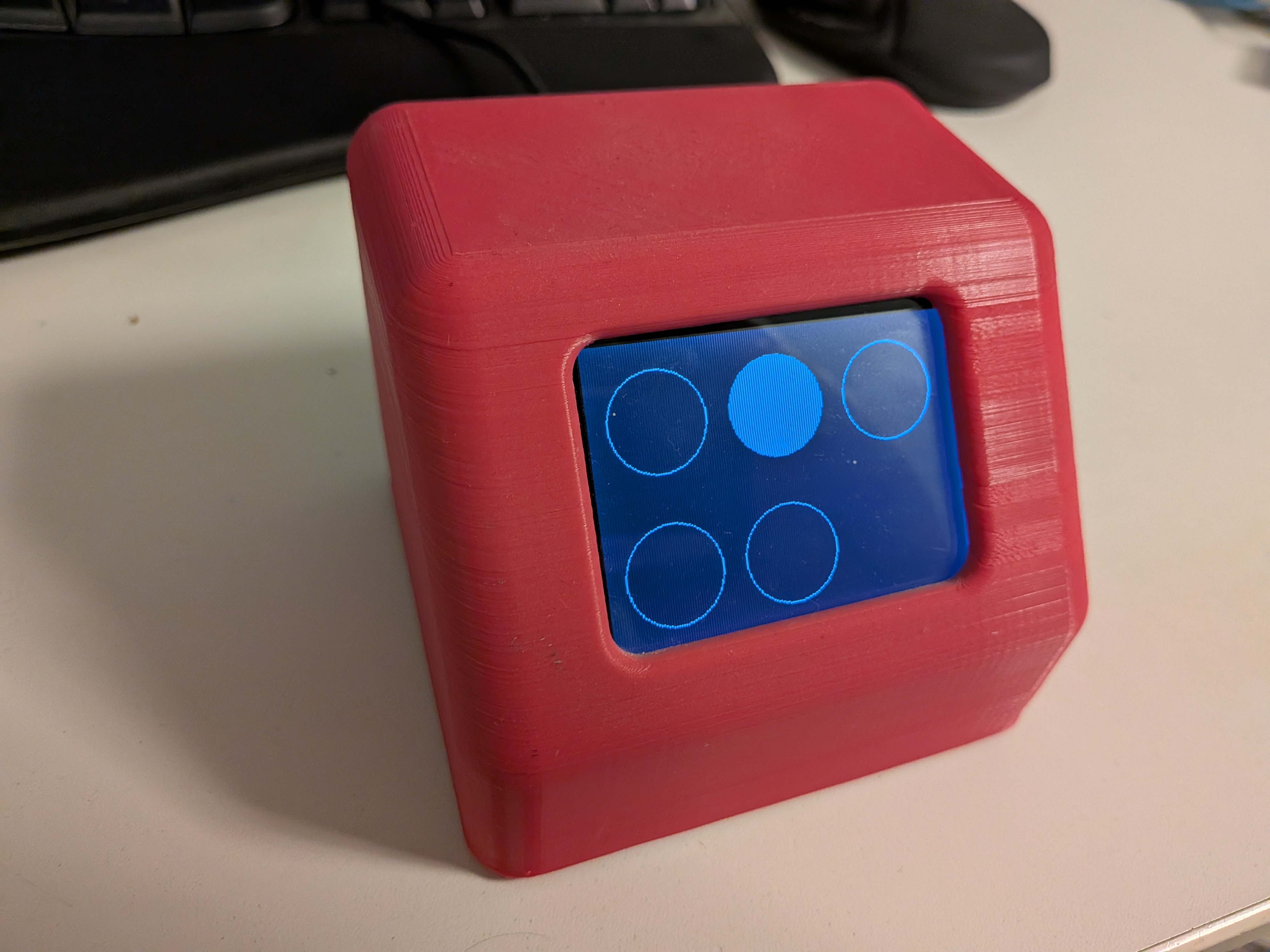
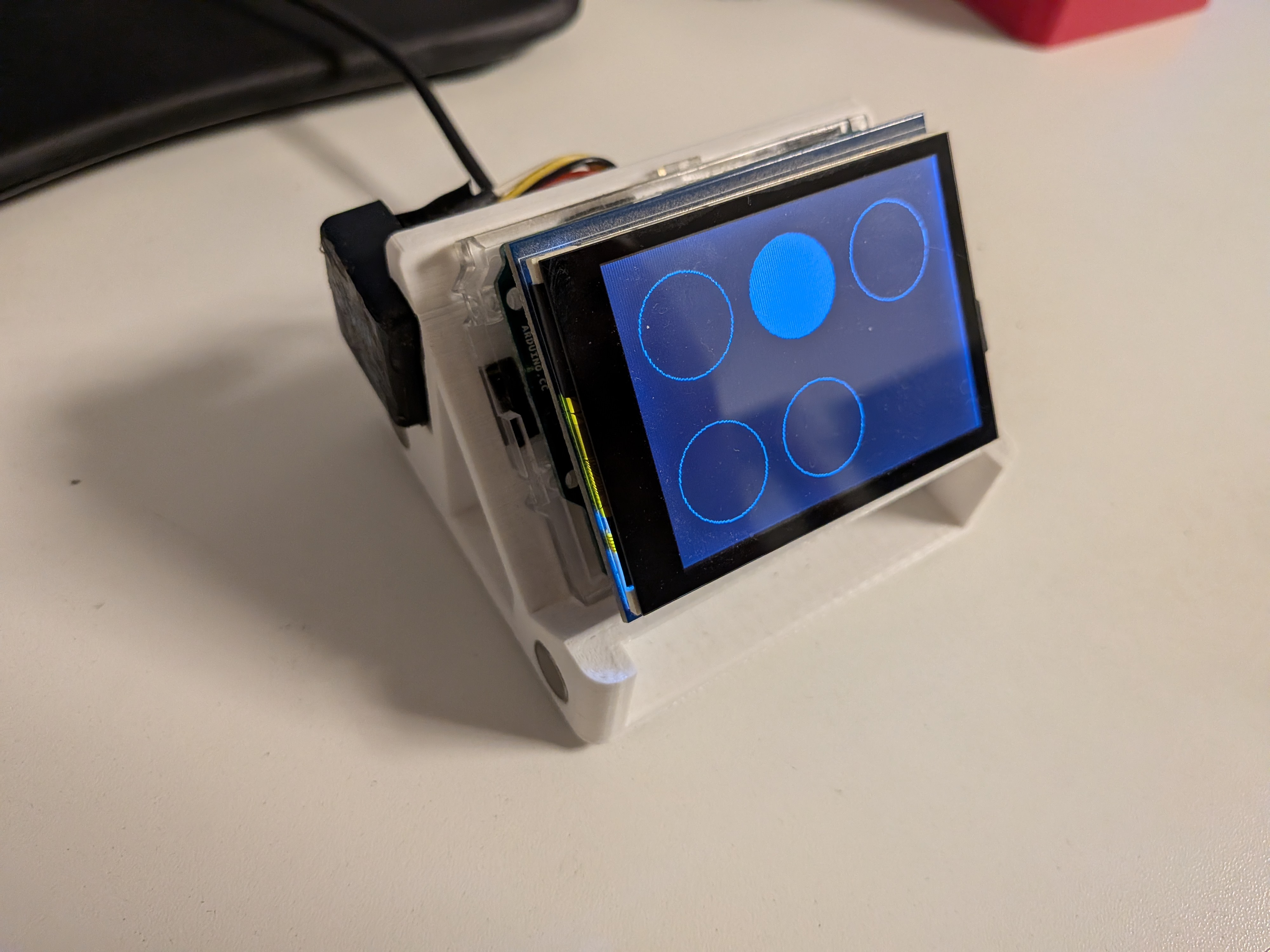
An Arduino Leonardo drives a 2.8" Adafruit ILI9341 TFT display with an FT6206 capacitive touch overlay, mounted in a 3D-printed case. A Priority 1 Design RFIDREAD-mRW RFID reader module is wired to the Arduino's hardware UART and just sits there polling for a tag. The Leonardo shows up over USB as a plain HID keyboard, so when the reader picks up a tag that matches, the board types the credential for whichever button is selected on screen straight into whatever window has focus.
There are five circles drawn on screen as buttons. Three of them actually do something: enter the Windows sign-in password, unlock KeePass (send its global Auto-Type hotkey, type the master password, then bring the window to the front), or enter a second Windows account's password. The other two are on screen and touch-selectable but not hooked up to anything yet.
Wiring notes, PlatformIO setup, and the source are all on GitHub.
Downloads
Full source
#include <Arduino.h>
#include <Adafruit_ILI9341.h>
#include <Keyboard.h>
#include <Adafruit_FT6206.h>
#include "secrets.h"


// The FT6206 uses hardware I2C (SCL/SDA)
Adafruit_FT6206 ts = Adafruit_FT6206();

#define TFT_CS 10
#define TFT_DC 9

Adafruit_ILI9341 tft = Adafruit_ILI9341(TFT_CS, TFT_DC);

//================================================================================================
//myCircleButton
//================================================================================================
#define buttonOneTouchXmin 25
#define buttonOneTouchXmax 95
#define buttonOneTouchYmin 145
#define buttonOneTouchYmax 235

#define buttonTwoTouchXmin 115
#define buttonTwoTouchXmax 194
#define buttonTwoTouchYmin 145
#define buttonTwoTouchYmax 235

#define buttonThreeTouchXmin 195
#define buttonThreeTouchXmax 280
#define buttonThreeTouchYmin 30
#define buttonThreeTouchYmax 210

// No button 6 (row 2, button 3's column): that corner's touch Y readings are noisy/inconsistent
// enough that even button 3 itself sometimes reads single-digit Y, so no threshold reliably
// separates a second button there. Only buttons 4 and 5 exist in row 2.
#define buttonFourTouchXmin 25
#define buttonFourTouchXmax 95
#define buttonFourTouchYmin 0
#define buttonFourTouchYmax 60

#define buttonFiveTouchXmin 115
#define buttonFiveTouchXmax 194
#define buttonFiveTouchYmin 20
#define buttonFiveTouchYmax 100

int buttonPressed = 0;

int buttonOneDimensions[ 3 ] = {55,61,40}; //values for x,y,radius
int buttonTwoDimensions[ 3 ] = {155,61,40}; //values for x,y,radius
int buttonThreeDimensions[ 3 ] = {255,61,40}; //values for x,y,radius
int buttonFourDimensions[ 3 ] = {55,180,40}; //values for x,y,radius
int buttonFiveDimensions[ 3 ] = {155,180,40}; //values for x,y,radius

int* allButtonDimensions[ 6 ] = {nullptr, buttonOneDimensions, buttonTwoDimensions, buttonThreeDimensions, buttonFourDimensions, buttonFiveDimensions};

void myCircleButton(int x, int y, uint8_t radius, uint16_t color) {

    tft.drawCircle(x, y, radius, color);
}

void deselectMyButton(int buttonDimensions[]){
      tft.fillCircle(buttonDimensions[0],buttonDimensions[1],buttonDimensions[2], ILI9341_BLACK);
      tft.drawCircle(buttonDimensions[0],buttonDimensions[1],buttonDimensions[2], ILI9341_DARKGREY);
}

void myCircleButtonPressed(int x, int y, uint8_t radius, uint16_t color, uint8_t buttonNumber){

    if (buttonPressed != 0 && buttonPressed != buttonNumber) {
      deselectMyButton(allButtonDimensions[buttonPressed]);
    }
    tft.fillCircle(x, y, radius, color);
    buttonPressed = buttonNumber;
}

//Variables for RFID:
// Even though the RFID Code is 16 char, the array (regular zero based array).
// has a final character, called the null byte or '\0'
//======================================================
//    enter password functions.
//======================================================
void openKeePass(){
      Keyboard.press(KEY_LEFT_CTRL);
      Keyboard.press(KEY_LEFT_ALT);
      Keyboard.press('a');
      delay(50);
      Keyboard.releaseAll();
      delay(100);
      Keyboard.print(keePassPassword);
      delay(50);
      Keyboard.write(KEY_RETURN);
      delay(600);
      // Win+N activates whatever is pinned at taskbar position N. Windows doesn't
      // apply focus-stealing prevention to this shell shortcut, unlike KeePass
      // trying to raise its own window after unlocking.
      Keyboard.press(KEY_LEFT_GUI);
      delay(50);
      Keyboard.press('0' + keePassTaskbarPosition);
      delay(50);
      Keyboard.releaseAll();
      delay(200);
      Keyboard.press(KEY_LEFT_CTRL);
      delay(50);
      Keyboard.press('e');
      delay(50);
      Keyboard.releaseAll();
}
void EnterWindowsPassword(){
      Serial.println("we have a windowsPassword match");
      Keyboard.print(windowsPassword);
      Keyboard.write(KEY_RETURN);
}

void EnterSecondWindowsPassword(){
      Serial.println("we have a windowsSecondPassword match");
      Keyboard.print(secondWindowsPassword);
      Keyboard.write(KEY_RETURN);
}

void ButtonFourAction(){
      Serial.println("buttonFour pressed - no action configured yet");
}

void ButtonFiveAction(){
      Serial.println("buttonFive pressed - no action configured yet");
}

//================================================================================================
//================================================================================================
//setup
//================================================================================================
//================================================================================================
void setup(void)
{
  Serial.begin(9600);
  //Serial1 is pin0 and pin1, this connects to the RFID chip.
  //The current RFID chip has a problem, where it only works between baud rates 9650 to 10610.
  //Lets divide the difference and set that as our baud rate.
  Serial1.begin(9600);
  Keyboard.begin();
  //-----------------------------------
  // initializing tft
  //-----------------------------------
  tft.begin();
  if (!ts.begin(40)) {
    Serial.println("Unable to start touchscreen.");
  }
  else {
    Serial.println("Touchscreen started.");
  }
  tft.fillScreen(ILI9341_BLACK);
  // origin = left,top landscape (USB left upper)
  tft.setRotation(3);
  //-----------------------------------
  // myCircle
  //-----------------------------------
  //Serial.println(myCircle(20, ILI9341_DARKGREY));
  myCircleButton(buttonOneDimensions[0],buttonOneDimensions[1],buttonOneDimensions[2], ILI9341_DARKGREY); //button 1.
  myCircleButton(buttonTwoDimensions[0],buttonTwoDimensions[1],buttonTwoDimensions[2], ILI9341_DARKGREY); //button 2.
  myCircleButton(buttonThreeDimensions[0],buttonThreeDimensions[1],buttonThreeDimensions[2], ILI9341_DARKGREY); //button 3.
  myCircleButton(buttonFourDimensions[0],buttonFourDimensions[1],buttonFourDimensions[2], ILI9341_DARKGREY); //button 4.
  myCircleButton(buttonFiveDimensions[0],buttonFiveDimensions[1],buttonFiveDimensions[2], ILI9341_DARKGREY); //button 5.
  // select button 1 (Windows password) by default on boot
  myCircleButtonPressed(buttonOneDimensions[0],buttonOneDimensions[1],buttonOneDimensions[2], ILI9341_DARKGREY, 1);
}
//================================================================================================
//================================================================================================
//loop
//================================================================================================
//================================================================================================
void loop()
{
    if (ts.touched())
    {
      // Retrieve a point
      TS_Point p = ts.getPoint();
      // 240 x 320 pixel screen
      int y = p.x;
      int x = p.y;

      Serial.print(x);
      Serial.print(" - ");
      Serial.println(y);

      if((x > buttonOneTouchXmin) && (x < buttonOneTouchXmax) && (y > buttonOneTouchYmin) && (y < buttonOneTouchYmax) && buttonPressed != 1) {
        Serial.println("buttonOne pressed");
        myCircleButtonPressed(buttonOneDimensions[0],buttonOneDimensions[1],buttonOneDimensions[2], ILI9341_DARKGREY, 1);
      }
      if((x > buttonTwoTouchXmin) && (x < buttonTwoTouchXmax) && (y > buttonTwoTouchYmin) && (y < buttonTwoTouchYmax) && buttonPressed != 2) {
        Serial.println("buttonTwo pressed");
        myCircleButtonPressed(buttonTwoDimensions[0],buttonTwoDimensions[1],buttonTwoDimensions[2], ILI9341_DARKGREY, 2);
      }
      if((x > buttonThreeTouchXmin) && (x < buttonThreeTouchXmax) && (y > buttonThreeTouchYmin) && (y < buttonThreeTouchYmax) && buttonPressed != 3) {
        Serial.println("buttonThree pressed");
        myCircleButtonPressed(buttonThreeDimensions[0],buttonThreeDimensions[1],buttonThreeDimensions[2], ILI9341_DARKGREY, 3);
      }
      if((x > buttonFourTouchXmin) && (x < buttonFourTouchXmax) && (y > buttonFourTouchYmin) && (y < buttonFourTouchYmax) && buttonPressed != 4) {
        Serial.println("buttonFour pressed");
        myCircleButtonPressed(buttonFourDimensions[0],buttonFourDimensions[1],buttonFourDimensions[2], ILI9341_DARKGREY, 4);
      }
      if((x > buttonFiveTouchXmin) && (x < buttonFiveTouchXmax) && (y > buttonFiveTouchYmin) && (y < buttonFiveTouchYmax) && buttonPressed != 5) {
        Serial.println("buttonFive pressed");
        myCircleButtonPressed(buttonFiveDimensions[0],buttonFiveDimensions[1],buttonFiveDimensions[2], ILI9341_DARKGREY, 5);
      }
    }
    //-----------------------------------
    // Reading the RFID
    //-----------------------------------
    char IncomingSerial[17];
    int WeHaveAMatch = 0;
    // when characters arrive over the serial port...
    if (Serial1.available() >= 17)
    {
        for (int i = 0; i < 17; i++)
        {
            IncomingSerial[i] = Serial1.read();
        }
        if (IncomingSerial[17])
        {
            WeHaveAMatch = 1;
        }
        // this works. It only checks the first 16 chars, as the 17th (\0) is most likely missing
        //  in the RFID Serial read.
        for (int i = 0; i < 16; i++)
        {
            //Serial.print(IncomingSerial[i]);
            //Serial.println("");
            if (IncomingSerial[i] != RFID[i])
            {
                WeHaveAMatch = 0;
            }
        }
        if (WeHaveAMatch == 0)
        {
            Serial.println("we dont have a match");
        }
        if (WeHaveAMatch == 1)
        {
            Serial.println("we have a match");
            Serial.println(buttonPressed);
            if (buttonPressed == 1)
            {
                EnterWindowsPassword();
            }
            if (buttonPressed == 2)
            {
                openKeePass();
            }
            if (buttonPressed == 3)
            {
                EnterSecondWindowsPassword();
            }
            if (buttonPressed == 4)
            {
                ButtonFourAction();
            }
            if (buttonPressed == 5)
            {
                ButtonFiveAction();
            }
        }
    }
}